Audit Log¶
Source PDF page(s): 55–56 (of raw/specs/MMS features v2.5.pdf)
User Guide section: §7 (of raw/specs/MMS_UserGuide_v2.5.0.0.docx)
Summary: Centralized audit logging and activity tracking — records user actions, configuration changes, and system events for traceability, compliance, and security monitoring.
Owner: Martin (project lead — confirm feature owner)
Status: shipped
Why¶
Traceability and accountability are required for compliance, security monitoring, and troubleshooting. See MMS Features v2.5 §7.
What¶
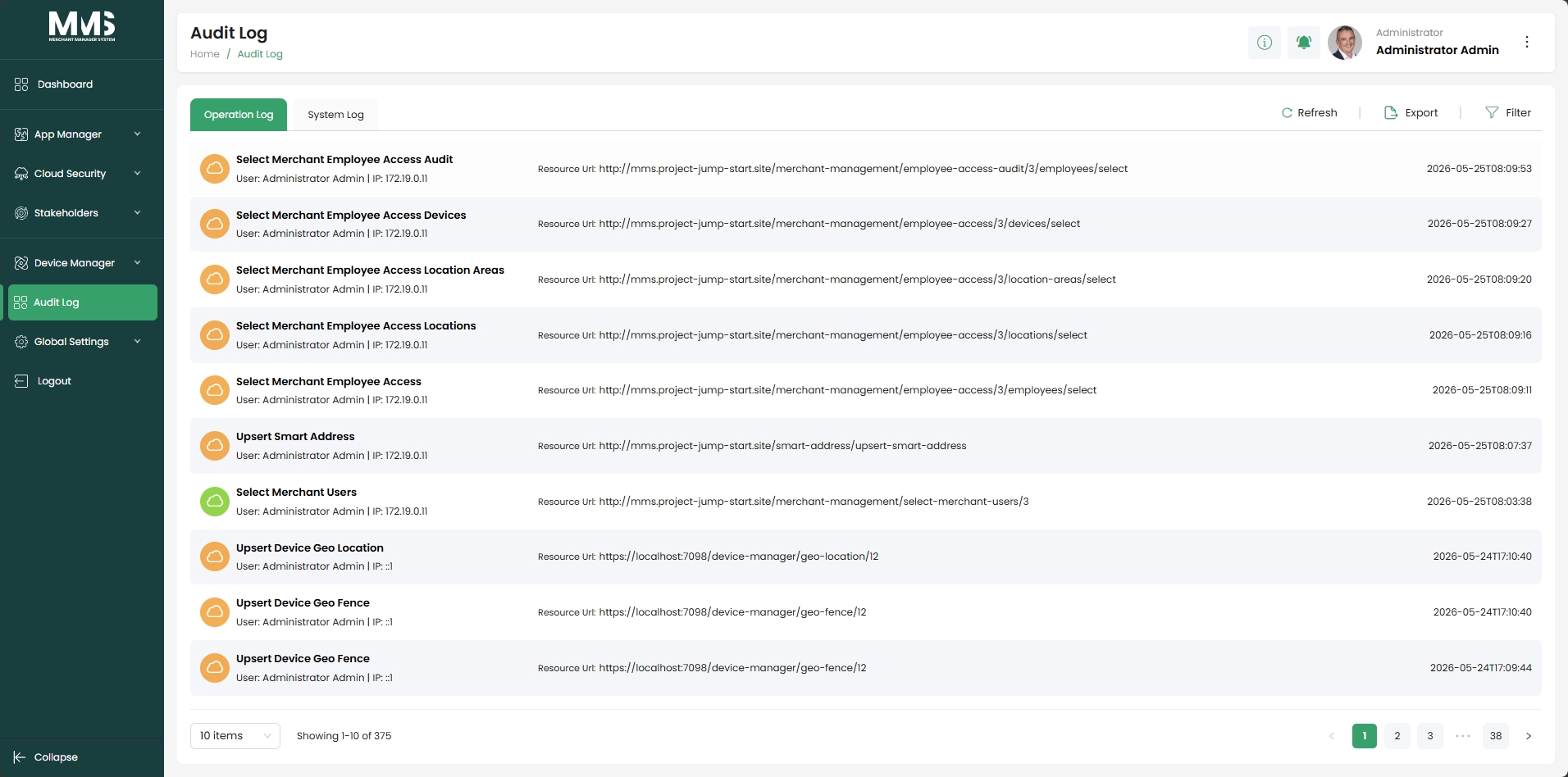
- Capture and maintain detailed records of user and system activities.
- Track configuration changes, updates, and operational actions.
- Record user info, IP address, accessed resource URL, and event timestamp per activity.
- Separate views: Operation Logs and System Logs.
- Filter and search audit records for easier investigation.
- Export audit log data for reporting, compliance, and external review.
- Chronological tracking to support troubleshooting and security investigations.
- Pagination support for large audit datasets.
Notes¶
- The Audit Log page is explicitly listed in the Global Setup → Timeouts Time Extension White List — it has an extended session timeout because administrators need longer active sessions when reviewing logs. See global-setup §6.3.
Out of scope¶
Per-device operational logs — see device-manager-device-setup (Device Setup → Logs tab). Those logs are device-specific; Audit Log covers system-wide user and administrative activity.
Acceptance criteria¶
- [x] Records user/system activities with user, IP, resource URL, and timestamp.
- [x] Separate Operation Logs and System Logs views.
- [x] Filter, search, and export audit records.
- [x] Pagination for large datasets.
Linked pages¶
- ../specs/mms-features-v2.5
- ../specs/mms-userguide-v2.5 — User Guide §7
- global-setup — Audit Log cited as a timeout-extension whitelist example
- device-manager-device-setup — per-device logs (distinct from system audit logs)
Screenshots¶
Status history¶
- 2026-05-27 — ingested from features doc v2.5 with status "Completed" → shipped
- 2026-06-03 — capability details and pagination noted; timeout whitelist context clarified from
raw/specs/MMS_UserGuide_v2.5.0.0.docx§7